
HRMS Bihar: Login, Salary Slip, Status Check & Teacher
HRMS Bihar stands for Human Resource Management System — the Government of Bihar’s official online portal for state employees, at hrms.bihar.gov.in. After logging in, employees download salary slips, view their service book, apply for leave, and check GPF and pension details. It is run by the National Informatics Centre (NIC) for the Government of Bihar.
This page is a straightforward help resource for Bihar government employees using HRMS. It covers how to log in, download your salary slip, reset a forgotten password, and use the mobile app, along with specific help for teachers and police staff, the separate BRDS system, and the login problems people run into most.
What Is HRMS Bihar and Who Uses It
HRMS Bihar is the employee self-service system for state government staff. Instead of visiting an office or treasury for routine work, employees handle it online: pay slips, leave, service records, and more, all tied to one login.
The portal serves state government employees across departments — Education, Health, Police, PWD, Revenue, Agriculture, and Home — covering over six lakh staff. It works as a centralized employee database, so your personal details, postings, and salary history sit in one place rather than in scattered paper files.
Here is something most explanations skip: how your salary actually reaches you. HRMS generates the monthly salary bill, which is then reconciled with CFMS, the state’s Comprehensive Financial Management System, before payment moves through the treasury to your bank account. This link between HRMS and CFMS is why salary processing pauses during financial year-end closing — the two systems settle their records first.
The portal is run by the National Informatics Centre (NIC) for the Government of Bihar, as part of the state’s move toward digital HR and e-governance. It handles payroll, leave, and service records for both serving and retired employees through a single, secure login.
Key details:
| Detail | Value |
|---|---|
| Portal name | HRMS Bihar |
| Official URL | hrms.bihar.gov.in |
| Operated by | NIC, Government of Bihar |
| Who can use it | Serving and retired Bihar government employees |
| Login methods | Password or OTP, plus captcha |
| Helpline | 0612 200 4000 |
| Support email | [email protected] |
| Mobile app | Official Android app (published by Bihar Prashasnik Sudhar Mission Society) |
How to Log In to HRMS Bihar (hrms.bihar.gov.in)
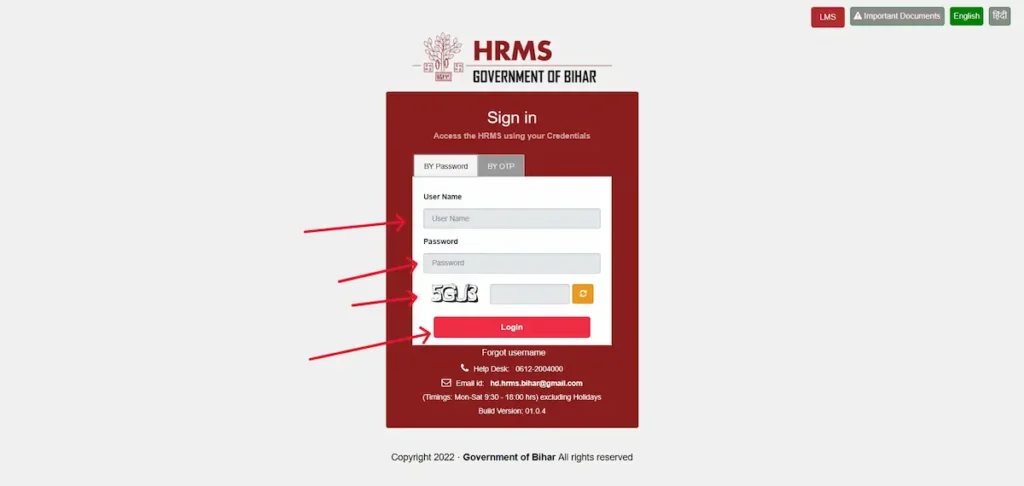
The login page gives you two ways in: by password or by OTP. Both start at the official portal, hrms.bihar.gov.in.
Log in with your password
- Open hrms.bihar.gov.in.
- Stay on the By Password option.

- Enter your Username or Employee ID.
- Enter your Password.
- Type the captcha shown on screen.
- Select Login. You’ll reach your dashboard, where your services are listed.
Log in with OTP (and first-time users)
If this is your first time signing in, use OTP — that is the official method for new users.
- Open the portal and choose the By OTP option.

- Enter your Employee ID or Username.
- Enter the OTP sent to your registered mobile number.
- Select Login.
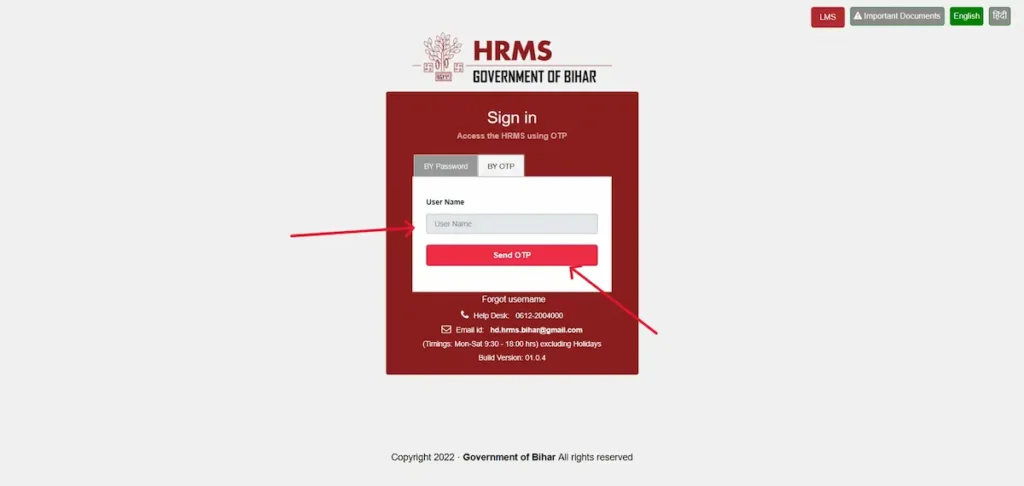
Keep your registered mobile handy, since the OTP goes only to that number. If yours has changed, your department office can update it.
A quick note: if the site won’t open at all, it’s usually scheduled maintenance, not a fault at your end. The portal goes offline during financial year-end closing while it reconciles salary bills with CFMS. Wait a while and try again.
How to Download Your HRMS Bihar Salary Slip (PDF)
Your monthly salary slip is the most common reason to use the portal. Once you’re logged in, you’ll find it in the salary section of your dashboard.
- Log in at hrms.bihar.gov.in.
- Open the salary section of your dashboard.
- Select the financial year and the month you need.
- View the slip, then download or print it as a PDF.
Save the file — you’ll need it for loan applications, income tax filing, or as proof of salary.
Saving it as a PDF
Most browsers let you save the slip straight to your device. If there’s no direct download button, use your browser’s Print option and choose Save as PDF.
If the slip asks for a password
Some slips open straight away; others are password-protected by the payroll system. If yours asks for a password and it isn’t obvious, your DDO (Drawing and Disbursing Officer — the officer who handles your salary) or the HRMS helpdesk can confirm the exact format. Avoid repeated guesses.
Annual salary statement
Alongside the monthly slip, the portal provides a consolidated statement for the full financial year (April to March). It totals your earnings and deductions across the year and is useful when filing income tax. You’ll find it in the same salary area as your monthly slips.
What a Bihar government salary slip typically shows (exact items vary by employee):
| Earnings | Deductions |
|---|---|
| Basic Pay | GPF or NPS contribution |
| Dearness Allowance (DA) | Group Insurance (GIS) |
| House Rent Allowance (HRA) | Professional Tax |
| Other allowances | Income Tax (TDS) |
| Gross salary | Net salary (after deductions) |
How to Check Your Status on HRMS Bihar
When people search for “status,” they usually want to know where a request they submitted has reached — a leave application, a service request, or a transfer. On HRMS, these move through an approval chain, so checking the status tells you which stage yours is at.
After logging in, open the section for whatever you submitted — for a leave request, that’s your leave section — and look for its current status. A request normally passes from you to your DDO (the officer who processes salaries and forwards requests), then to the approving officer. So a “pending” status usually means it’s waiting with an approver, not that something has gone wrong.
If a request stays pending far longer than expected, follow up with your DDO or department office, since the next action sits with them.
How to View Your Service Book Online
Your service book is the official record of your government career. On HRMS Bihar it holds your date of appointment, promotions, transfers, pay increments, and grade history — the same details that once sat in a paper file at your office.
After logging in, open the service book section of your dashboard to see your service history. Check that the key dates and postings match your own records, since these details feed into your pay, seniority, and pension later on.
If something is wrong — a missing promotion, an incorrect joining date, a transfer not recorded — report it to your DDO or establishment section early. Corrections aren’t instant; they pass through official approval before the record updates. Raising it sooner avoids trouble when it counts, such as at promotion or retirement.
How to Apply for Leave on HRMS Bihar
HRMS lets you apply for leave online instead of filling a paper form, and then track where your request stands.
After logging in, open the leave section, choose the type of leave, set your dates, and submit. Common categories for Bihar government staff include Earned Leave (EL), Casual Leave (CL), and Medical Leave, though the exact options depend on your service rules and post.
Once submitted, your request moves to your reporting officer or DDO for approval. You can check its status on the same screen. Short leave, like a single day of casual leave, usually clears quickly; longer and medical leave often take more time, since they need fuller review. Apply ahead where you can, so approval comes through before your leave begins.
GPF, NPS, and Pension Services on HRMS Bihar
Which retirement scheme applies to you depends on when you joined. Employees who joined Bihar government service before 1 September 2005 come under the General Provident Fund (GPF) and the old pension scheme. Those who joined on or after that date come under the National Pension System (NPS).
For serving employees, HRMS shows your GPF or NPS account details and statements once you log in — useful for tracking your contributions and balance through the year.
For retired employees, the portal mainly concerns pension records. Access for pensioners can work differently from serving staff, and some pension services run through your former department or the treasury rather than the main dashboard. If you’re retired and can’t find what you need, contact your former office or the pension section with your PPO (Pension Payment Order) number — the reference that identifies your pension account.
HRMS Bihar Teacher Login (Education Department)
This is where many teachers get stuck, so here’s the honest picture. Most Bihar Education Department school teachers do not use the general HRMS portal for salary and service records. Those are handled through the department’s own system, e-Shikshakosh (eshikshakosh.bihar.gov.in), run by the Bihar Education Project Council.
If you’re a government school teacher — niyojit, or appointed through BPSC — you log in to e-Shikshakosh with your 12-digit Teacher ID, after choosing the correct User Type on the login screen. Picking the wrong type (for example, “Teacher” instead of “Niyojit Teacher”) is the most common reason a teacher login fails, so choose the one that matches your appointment category. Your salary slip sits in the payroll (e-PMS) part of the portal.
One thing to know for 2026: teacher salary is now tied to your daily attendance marked in the e-Shikshakosh app. If your attendance hasn’t synced, your salary status can show as “On Hold” until it clears — so keep the app updated and your attendance marked.
When you can’t log in or your salary is stuck, the people who can actually help are your Head Master, Block Education Officer (BEO), or the district education office (DEO), depending on the problem. They hold your correct Teacher ID and can escalate salary or record issues.
If you’re a teacher treated as regular government staff rather than school-cadre, you may instead use the general HRMS portal. If you’re unsure which applies to you, ask your BEO or DDO before assuming.
HRMS Bihar for Police and Other Departments
Bihar Police staff, along with employees in Health, PWD, Revenue, Agriculture, and Home, are treated as general state government employees. There is no separate police HRMS portal and no special police login. The process is the same one covered above.
If your department issued you HRMS credentials, you sign in at hrms.bihar.gov.in and use the same salary-slip, service-book, and leave steps as any other employee. Some departments’ payroll runs instead through the state’s e-Nidhi (CFMS) system, so use whichever portal your office set you up on. If you’re unsure which applies to you, ask your DDO or office clerk — they issued your login and know which system holds your records.
New Employee Registration and the HRMS Form
If you’ve just joined, here’s the part that trips up most new employees: you cannot register yourself on HRMS Bihar. There is no public sign-up form. Your account is created at the department end by your DDO or HR cell, who enter your details into the system. Once that’s done, you log in for the first time using OTP, with the User ID sent to your registered mobile number.
What you’ll need on record is an active employee ID and a working mobile number tied to your service details, since every OTP and alert goes to that number.
The most common reason a new employee can’t log in is simple: your DDO hasn’t entered your data into the system yet. Until that happens, the portal has no record to match, and login fails. The fix is to contact your DDO or district HR cell with your appointment details and ask them to complete your entry.
Is there an HRMS form to download?
Many people search for an “HRMS Bihar form PDF.” There is no official self-registration form you download and submit yourself, because onboarding is handled inside the system by your DDO, not through a public form. Be cautious of third-party sites offering an “HRMS form” — they are not official. If your office needs details from you, they will give you the correct internal format.
Password Reset and Common Login Problems
Reset a forgotten password
- Open hrms.bihar.gov.in and select Forgot Password.
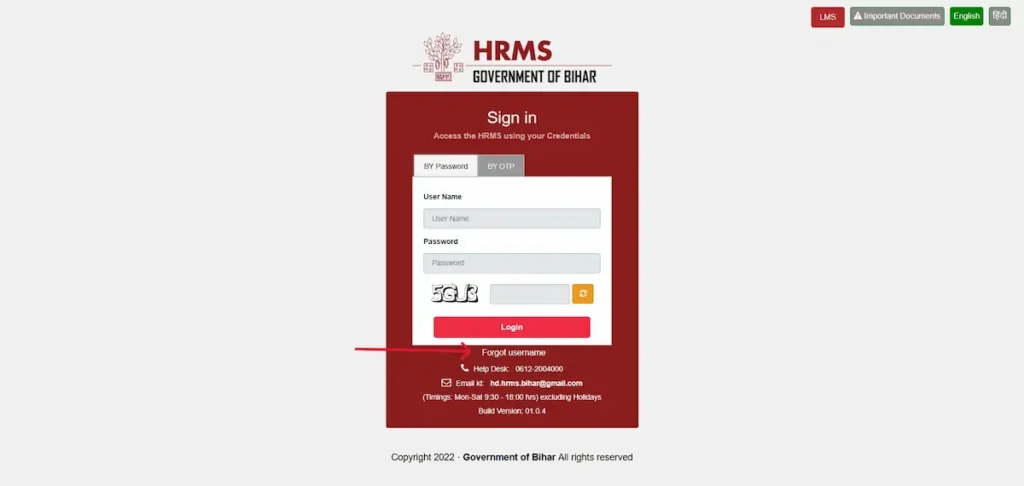
- Enter your registered mobile number.
- Enter the OTP sent to that number.
- Set and confirm your new password.
When the OTP doesn’t arrive
This is the problem people hit most. If your OTP hasn’t come through, wait a minute and request it again, since it can be delayed. Check that you’re using the mobile number registered in your service record, not a newer one the system doesn’t have, and confirm your phone has network. If it still doesn’t arrive, your number likely isn’t updated in your record — contact the help desk or your DDO to fix it.
Other login problems
| Problem | Likely cause | What to do |
|---|---|---|
| Captcha rejected | Characters misread | Refresh the captcha and type it carefully |
| Invalid credentials | Wrong ID or password | Recheck your employee ID with your DDO |
| Account locked | Too many failed attempts | Contact the help desk or your DDO |
| Site won’t open | Scheduled maintenance, such as year-end reconciliation with CFMS | Wait and try again later |
| Wrong details on record | Data mismatch from source records | Ask your DDO to raise a correction |
For anything you can’t resolve yourself, the official HRMS help desk is 0612 200 4000 or [email protected] (Monday to Saturday, 9:30 AM to 6:00 PM). Your DDO is the right contact for anything tied to your service record.
The Official HRMS Bihar Mobile App
Bihar has an official HRMS mobile app, published by the Bihar Prashasnik Sudhar Mission Society on the Google Play Store. It’s Android only — there is no iPhone version at present. This corrects a claim some websites still make that no app exists; it does.
The app covers salary slips and annual income statements, your service book, leave, LTC claims, personal-information change requests, and notifications, with multi-language support. You sign in with the same credentials you use on the website.
One honest point worth knowing: the app currently carries a low rating, with users reporting login and OTP problems. If it won’t let you in, the website (hrms.bihar.gov.in) is often the more dependable option. Use whichever works for you on the day.
HRMS 2.0 Bihar — What’s New
“HRMS 2.0” is the name used for the upgraded version of the portal. The change most employees notice is that the site now works properly in a mobile browser, without needing desktop mode, and loads faster than the older version.
You don’t need a different web address for it. The current version loads automatically when you open hrms.bihar.gov.in, so there’s no separate “2.0” link to hunt for.
If you come across long lists of advanced new features elsewhere, treat them cautiously. The reliable guide is what the portal actually shows once you log in, and the help desk can confirm anything important.
BRDS HRMS vs HRMS Bihar — Which One Do You Need?
These two get mixed up constantly, so here’s the clear difference.
HRMS Bihar (hrms.bihar.gov.in) is the general portal for state government employees, built by NIC.
BRDS HRMS (brdshrms.bihar.gov.in) is a completely separate system, built on Oracle PeopleSoft, for staff of the Bihar Rural Development Society — the body under the Rural Development Department that runs schemes like MGNREGA and Pradhan Mantri Awas Yojana–Gramin (PMAY-G). You log in there with your User ID and password, and by selecting your language.
How to know which is yours: if you’re a general state government employee, use hrms.bihar.gov.in. If you work for the Rural Development Society, use brdshrms.bihar.gov.in. Your appointment tells you which one — they are not interchangeable, and a login for one will not work on the other.
| HRMS Bihar | BRDS HRMS | |
|---|---|---|
| Web address | hrms.bihar.gov.in | brdshrms.bihar.gov.in |
| Built on | NIC platform | Oracle PeopleSoft |
| For whom | General state employees | Rural Development Society staff |
How to Make Sure You’re on the Official Portal
Only a few web addresses are official for these systems: hrms.bihar.gov.in for general employees, and brdshrms.bihar.gov.in for Rural Development Society staff. For teachers, the official portal is e-Shikshakosh (eshikshakosh.bihar.gov.in). Anything else claiming to be the login page is not official.
Never enter your User ID, password, or OTP on a site you reached through an advertisement or an unfamiliar link. Type the official address yourself, or use a bookmark you trust.
To be clear about this page: it’s an independent help resource, not the government portal. We explain how the system works and point you to the official sites, but we never ask for your login details. For the actual sign-in, always use the official address.
Frequently Asked Questions
What is the full form of HRMS Bihar?
HRMS stands for Human Resource Management System. It is the Government of Bihar’s online portal for state employees, at hrms.bihar.gov.in, used to download salary slips, view the service book, apply for leave, and check GPF, NPS, and pension details.
How do I download my HRMS Bihar salary slip?
Log in at hrms.bihar.gov.in with your employee ID and password or OTP, open the salary section of your dashboard, select the financial year and month, and download the slip as a PDF to save or print.
How do I reset my HRMS Bihar password?
On the login page, select Forgot Password, enter your registered mobile number, and enter the OTP sent to it. Then set a new password. If the OTP does not arrive, your mobile number may not be updated in your record.
What if the OTP doesn’t arrive?
Wait a minute and request it again. Check you’re using the mobile number registered in your service record and that your phone has network. If it still fails, contact the help desk at 0612 200 4000 or ask your DDO to update your number.
Which portal and ID do teachers use?
Most Bihar government school teachers use e-Shikshakosh (eshikshakosh.bihar.gov.in), not the general HRMS portal. They log in with a 12-digit Teacher ID and the correct user type. If unsure, check with your Head Master or Block Education Officer.
Do Bihar Police use a different portal?
No. There is no separate police portal. Bihar Police staff are treated as general state government employees and use the same process as other departments. If unsure which system holds your payroll, ask your DDO.
Can I register myself on HRMS Bihar?
No, you cannot self-register. Your DDO or HR cell creates your account by entering your details into the system. You then log in for the first time using the User ID and OTP sent to your registered mobile number.
Is there an HRMS Bihar app?
Yes, an official Android app is on the Google Play Store, published by the Bihar Prashasnik Sudhar Mission Society, with salary slips, service book, leave, and LTC. There is no iPhone version yet, and the website is often more reliable.
What is BRDS HRMS?
BRDS HRMS (brdshrms.bihar.gov.in) is a separate system on Oracle PeopleSoft for staff of the Bihar Rural Development Society, which runs rural schemes like MGNREGA. General state employees use hrms.bihar.gov.in instead; the two logins are not interchangeable.
Why is the HRMS portal not opening?
The portal is often taken offline for scheduled maintenance, such as at financial year-end when salary bills are reconciled with the CFMS system. If it won’t load, this is usually planned downtime rather than a fault at your end. Try again later.